# Manufacturers

This page contains information about the manufacturers of the products that are listed in J2Commerce.

Manufacturers are listed with the following details:

* Company
* Tax Number
* Address
* City
* Zip
* Phone and Mobile
* Country
* Zone

Before you can add a manufacturer to a product, you have to create the manufacturer.&#x20;

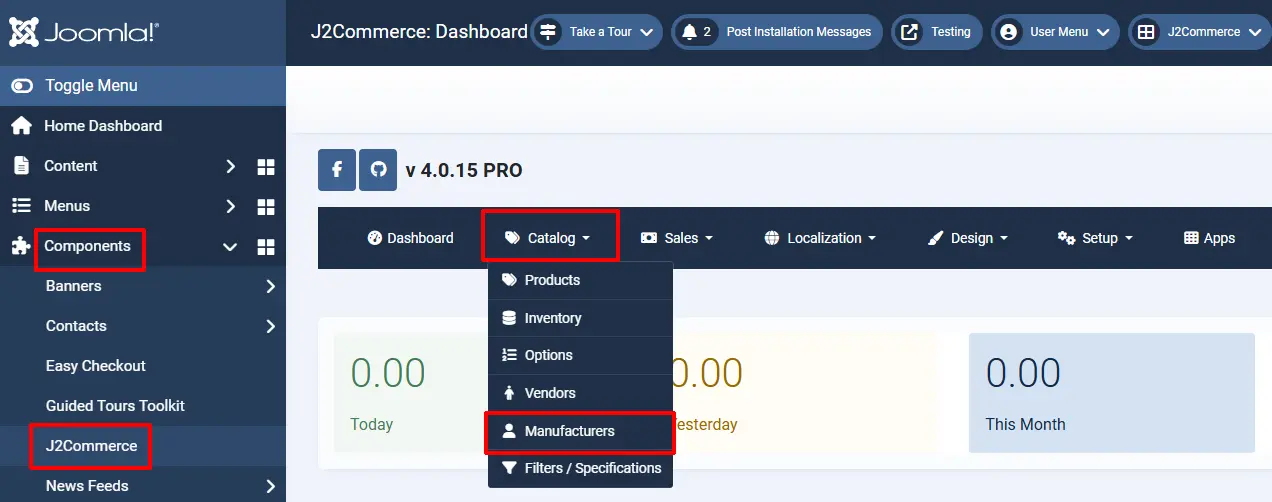
**Step 1:** Go to Components > J2Commerce > Catalog > Manufacturer

<figure><img src="https://1405307842-files.gitbook.io/~/files/v0/b/gitbook-x-prod.appspot.com/o/spaces%2FkVKvFBYm8luCOko7zt2v%2Fuploads%2FpKMEMqq5hnXe8rOg6EEl%2Fmanufacturers1.webp?alt=media&#x26;token=18e29228-2be1-4f0d-a1b6-5bd654d7768b" alt=""><figcaption></figcaption></figure>

**Step 2:** Select 'New'

**Step 3:** Fill in all of the boxes with the manufacturer's information

The image shown below is how a manufacturer is added.

![Add new manufacturer](https://1405307842-files.gitbook.io/~/files/v0/b/gitbook-x-prod.appspot.com/o/spaces%2FkVKvFBYm8luCOko7zt2v%2Fuploads%2FrrYlS147cL6fRftWLUcQ%2Fmanufacturers3.webp?alt=media\&token=ea34eb78-d80e-4f07-b1f8-665bc739882a)

## Associating them with products <a href="#associating-them-to-products" id="associating-them-to-products"></a>

To add the manufacturers to the product, follow the below instructions:

* Navigate to Content > Articles. Find your product
* &#x20;Open the Product. Click on J2Commerce (or J2Store cart) > the 'General' tab.
* Click on the manufacturer's dropdown box.
* The list of available manufacturers will be available.
* Choose your manufacturer and save.

![Adding brand to product](https://1405307842-files.gitbook.io/~/files/v0/b/gitbook-x-prod.appspot.com/o/spaces%2FkVKvFBYm8luCOko7zt2v%2Fuploads%2FBO1OCIYp5cdS7FGEvy8i%2Fmanufacturers4.webp?alt=media\&token=fa74aa73-bdbd-47c8-8fbe-009aa7108f20)

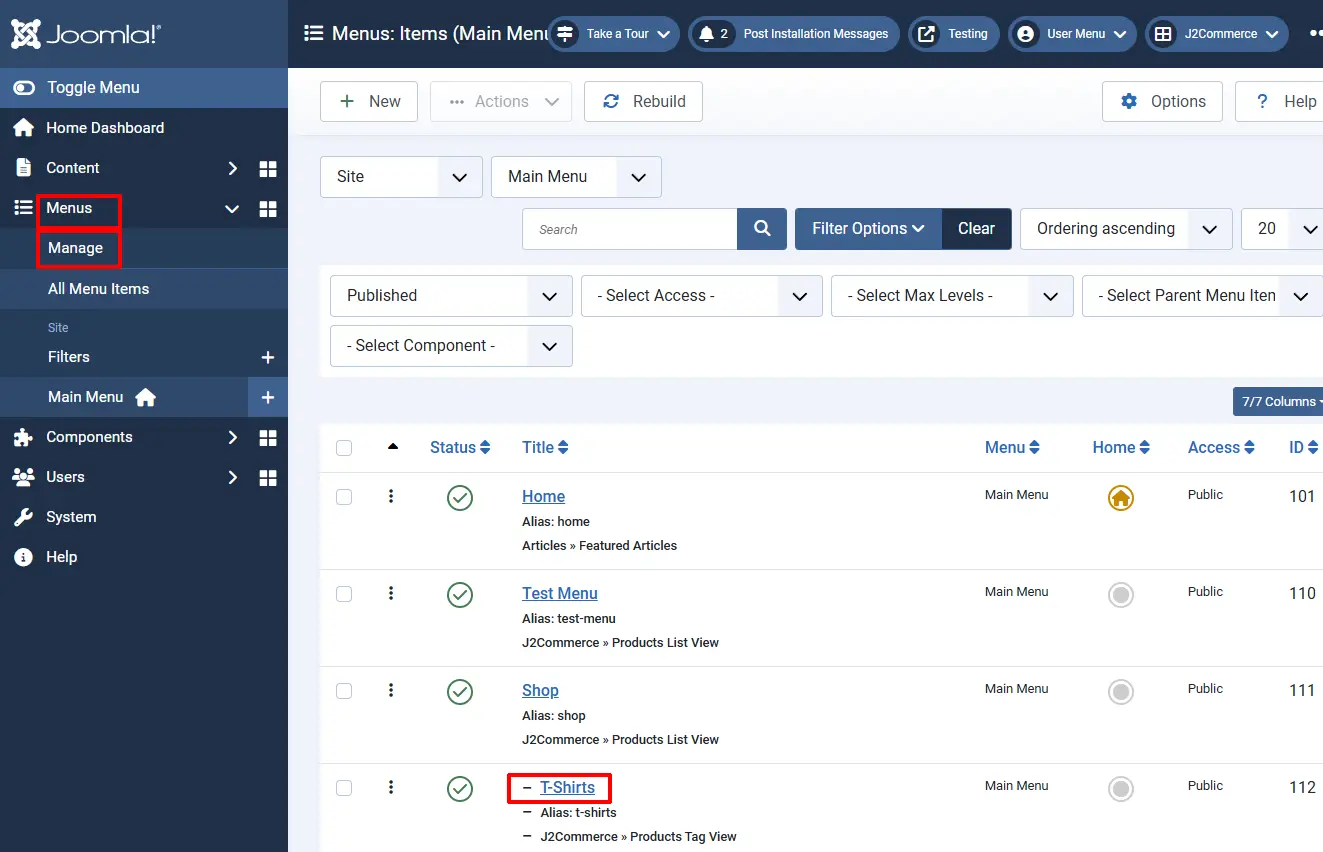
* Navigate to Menus > Manage. Find your product’s menu and open it

<figure><img src="https://1405307842-files.gitbook.io/~/files/v0/b/gitbook-x-prod.appspot.com/o/spaces%2FkVKvFBYm8luCOko7zt2v%2Fuploads%2FU95e0s0k6W92AIkYjv2V%2Fmanufacturers6.webp?alt=media&#x26;token=0ed67824-531a-4ce2-8db2-e4f6441b323c" alt=""><figcaption></figcaption></figure>

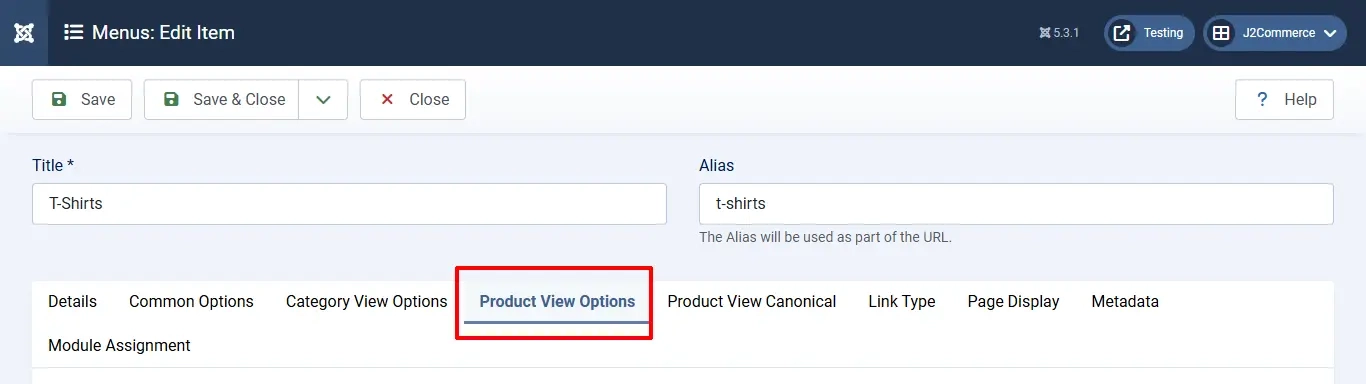
* Click on the 'Product View Options' tab

<figure><img src="https://1405307842-files.gitbook.io/~/files/v0/b/gitbook-x-prod.appspot.com/o/spaces%2FkVKvFBYm8luCOko7zt2v%2Fuploads%2FuWHHNqArsdZ3QghVl6dV%2Fmanufacturers5a.webp?alt=media&#x26;token=ae3f8b10-72a4-42db-90c0-2e928554555c" alt=""><figcaption></figcaption></figure>

* Set the option Brand to 'Yes'

<figure><img src="https://1405307842-files.gitbook.io/~/files/v0/b/gitbook-x-prod.appspot.com/o/spaces%2FkVKvFBYm8luCOko7zt2v%2Fuploads%2F9PmLRocdrz6L2bgtCgHi%2Fmanufacturers5.webp?alt=media&#x26;token=46cdc04e-48b7-4ef6-8564-00bfbe272c43" alt=""><figcaption></figcaption></figure>

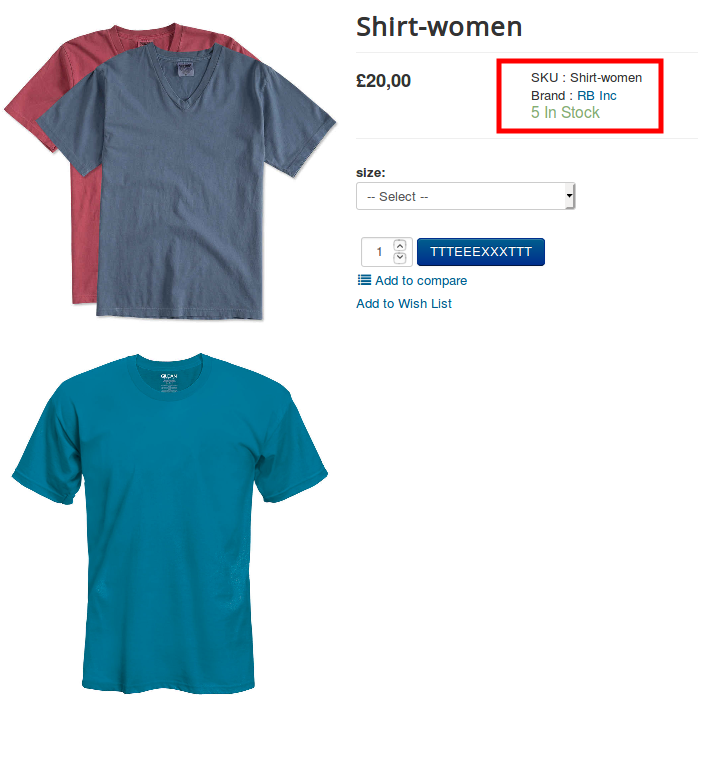
This would display the associated brand on the product view as follows:

**Frontend**
![Frontend](https://raw.githubusercontent.com/j2store/doc-images/master/catalog/manufacturers/manufacturers-frontend.png)

## **Filtering products based on manufacturers/brands:**

Once you associate manufacturers with the appropriate products, you can also let users filter products based on brands.

* Post linking brands with the concerned products. Navigate to Menus > Manage.&#x20;
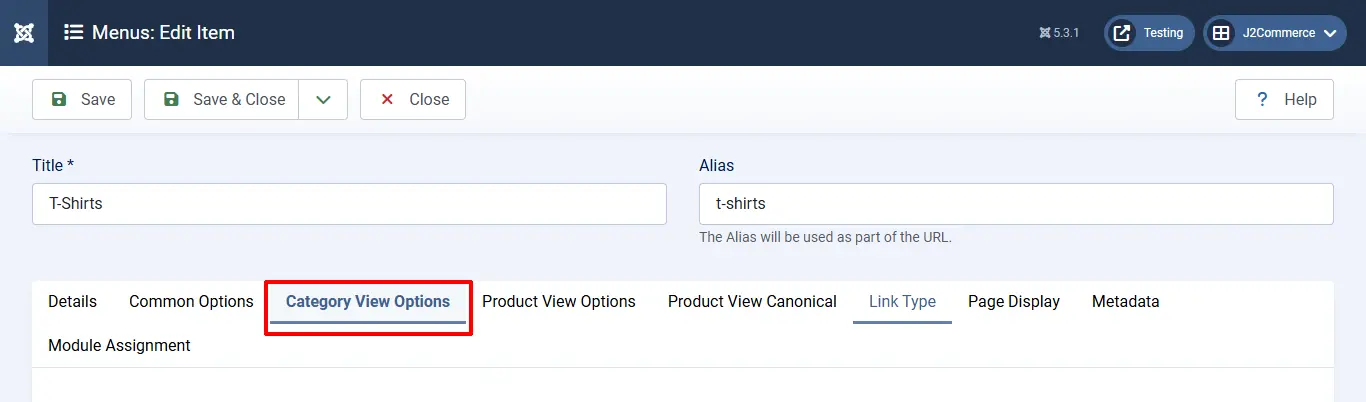
* Open your product menu > Category View Options tab.

<figure><img src="https://1405307842-files.gitbook.io/~/files/v0/b/gitbook-x-prod.appspot.com/o/spaces%2FkVKvFBYm8luCOko7zt2v%2Fuploads%2F46AC0jhoNCJpoKdM3ZDv%2Fmanufacturers7a.webp?alt=media&#x26;token=aed51e40-67e0-4e4c-8087-c2e29b6877ce" alt=""><figcaption></figcaption></figure>

* Scroll down to the Filters section. Set the option: **Manufacturer/brand filter** to Show.
* Set the option **Manufacturer filter listing type** to **Show all filters.**

![](https://1405307842-files.gitbook.io/~/files/v0/b/gitbook-x-prod.appspot.com/o/spaces%2FkVKvFBYm8luCOko7zt2v%2Fuploads%2FiqQsHxzsjuUCEwhZgNUm%2Fmanufacturers7.webp?alt=media\&token=147bbb99-0fc1-4462-b3f3-338bdbaeab57)

* Once the manufacturer filters are enabled, the filters would be listed and users can filter the products based on brands.

![](https://1405307842-files.gitbook.io/~/files/v0/b/gitbook-x-prod.appspot.com/o/spaces%2FkVKvFBYm8luCOko7zt2v%2Fuploads%2Fgit-blob-5ae7629337cd1b5fe20dacc8dea731defc3556f5%2Fscreenshot-localhost-2020.08.19-12_58_14.png?alt=media)