# Special module positions

J2Commerce offers special module positions to place the Joomla’s custom HTML module or any other modules (for example, cart module) in store pages.

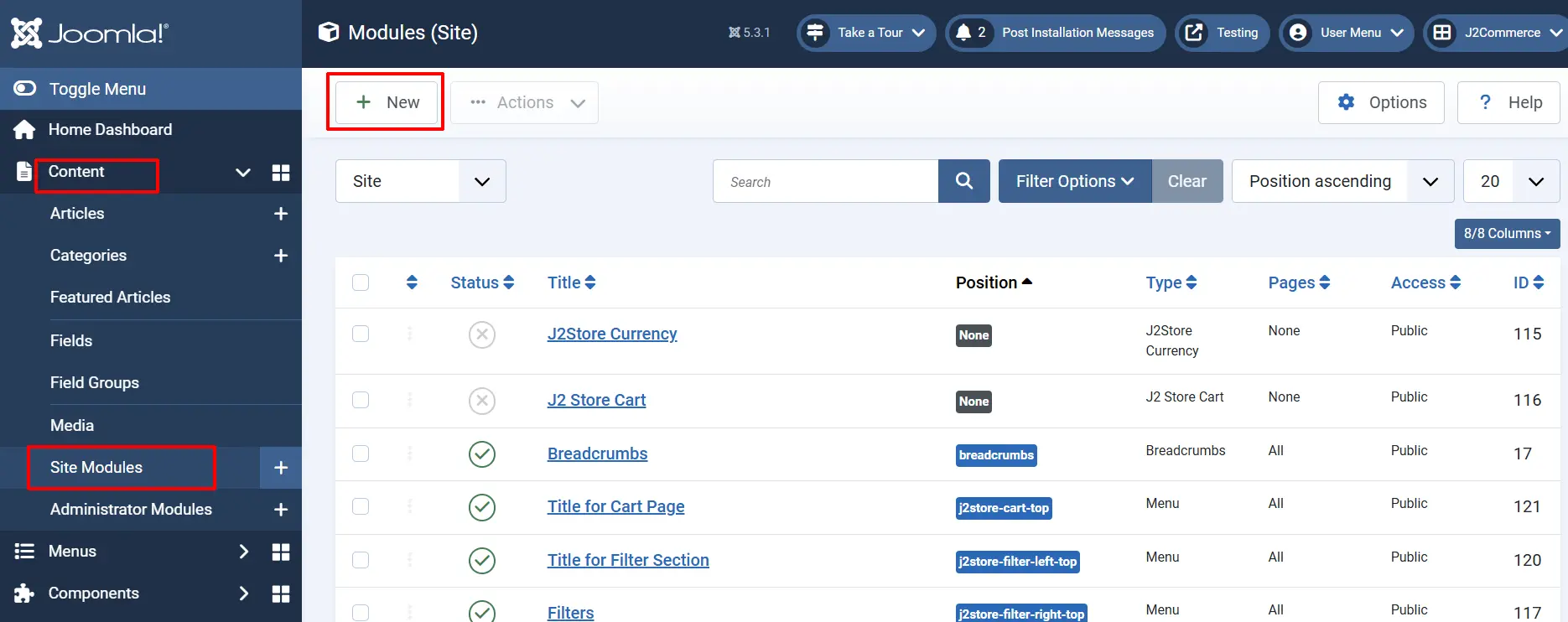
* Go to Content > Site Modules > New.

<figure><img src="https://1405307842-files.gitbook.io/~/files/v0/b/gitbook-x-prod.appspot.com/o/spaces%2FkVKvFBYm8luCOko7zt2v%2Fuploads%2FHWQRUkw5PIT5gwCfTrN5%2Fsite.webp?alt=media&#x26;token=7cc61398-8696-4390-9a06-e0a7de6c1103" alt=""><figcaption></figcaption></figure>

* Select any module in the list.&#x20;
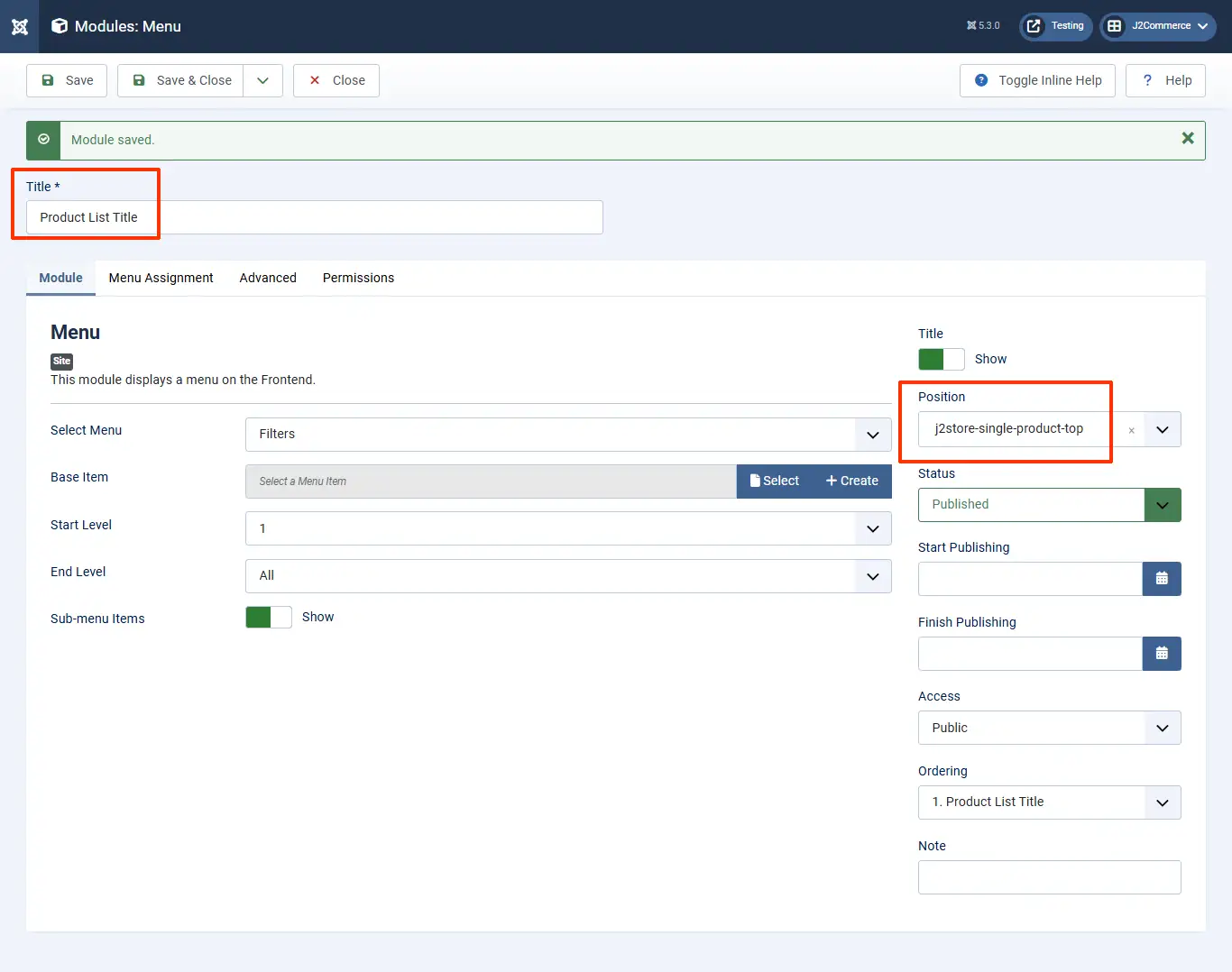
* Enter the title and set the status to Published.
* Simply copy the module position from the list given below and paste it in the "position" search box on the right and press Enter.
* Assign the module to the menu and save.

**The following are the custom module positions :**

## Product Category listing <a href="#product-category-listing" id="product-category-listing"></a>

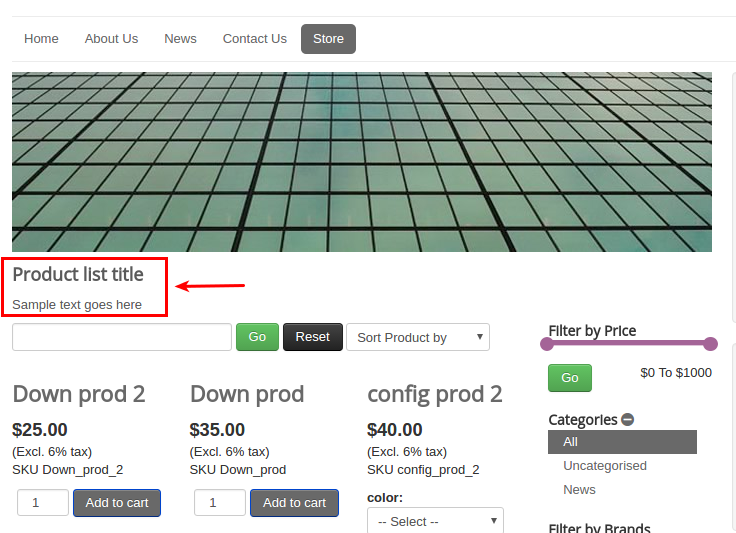
**j2store-product-list-top** - Top of product category listing page

**j2store-product-list-bottom** - Bottom of product category listing page

![Category listing position](https://1405307842-files.gitbook.io/~/files/v0/b/gitbook-x-prod.appspot.com/o/spaces%2FkVKvFBYm8luCOko7zt2v%2Fuploads%2F6kke6Mj8K5B1S66eWZiN%2Fnew_modules.webp?alt=media\&token=facd2266-fe08-4047-b5b9-b9f9b6374e2b)

![Category list frontend view](https://raw.githubusercontent.com/j2store/doc-images/master/layout/special-module-positions/spl-mod-cat-front.png)

## Single product view <a href="#single-product-view" id="single-product-view"></a>

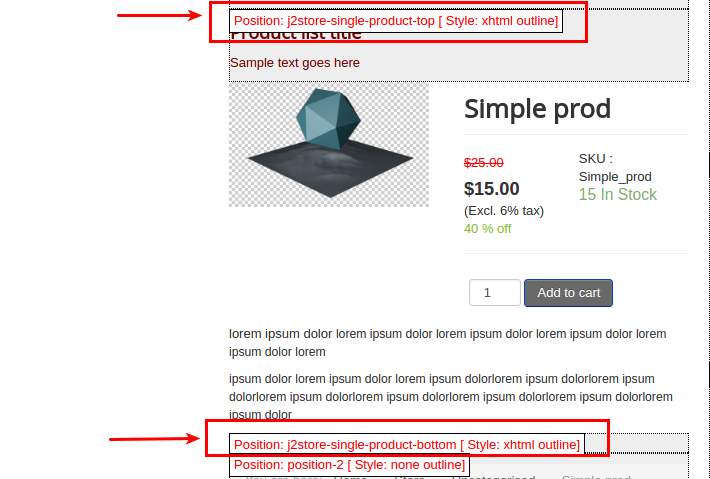
**j2store-single-product-top** - Top of product view layout

**j2store-single-product-bottom** - Bottom of product view layout

<figure><img src="https://1405307842-files.gitbook.io/~/files/v0/b/gitbook-x-prod.appspot.com/o/spaces%2FkVKvFBYm8luCOko7zt2v%2Fuploads%2FBQyajJ7Kxzg2wo41bcHi%2Fnew_modules1.webp?alt=media&#x26;token=c8b24b37-df28-4288-b093-5e53970babf5" alt=""><figcaption><p>Creating a module position</p></figcaption></figure>

![Module](https://1405307842-files.gitbook.io/~/files/v0/b/gitbook-x-prod.appspot.com/o/spaces%2FkVKvFBYm8luCOko7zt2v%2Fuploads%2F0QGQnIEyksMjag0NtgTw%2Fmodules_list.webp?alt=media\&token=ef155c47-f3ec-48e2-b7fd-08ebbca47ce5)

<figure><img src="https://1405307842-files.gitbook.io/~/files/v0/b/gitbook-x-prod.appspot.com/o/spaces%2FkVKvFBYm8luCOko7zt2v%2Fuploads%2FHUXtHDdF4M7eEGSMoQWa%2Fmodule-positions.png?alt=media&#x26;token=39253b0e-416b-4599-8c78-0b920ee1869c" alt=""><figcaption></figcaption></figure>

## Filter Section <a href="#filter-section" id="filter-section"></a>

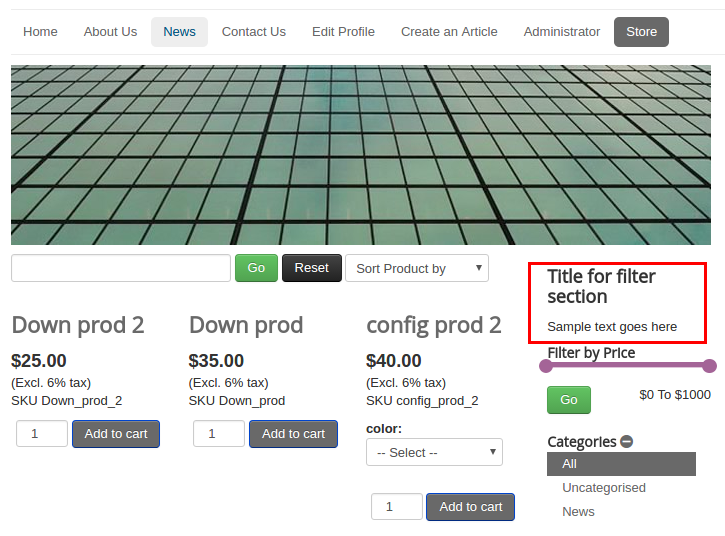
**j2store-filter-left-top** - Top of left filter

**j2store-filter-left-bottom** - Bottom of left filter

**j2store-filter-right-top** - Top of right filter

**j2store-filter-right-bottom** - Bottom of right filter

![Filters positions](https://1405307842-files.gitbook.io/~/files/v0/b/gitbook-x-prod.appspot.com/o/spaces%2FkVKvFBYm8luCOko7zt2v%2Fuploads%2F9XSNh3bdIj9lt6WSk84k%2Ffilter_module.webp?alt=media\&token=2b73bb2a-7ab8-4c8b-a674-165e175b476a)

![Frontend view of filters](https://raw.githubusercontent.com/j2store/doc-images/master/layout/special-module-positions/spl_mod_pos_filters_front.png)

## Cart page <a href="#cart-page" id="cart-page"></a>

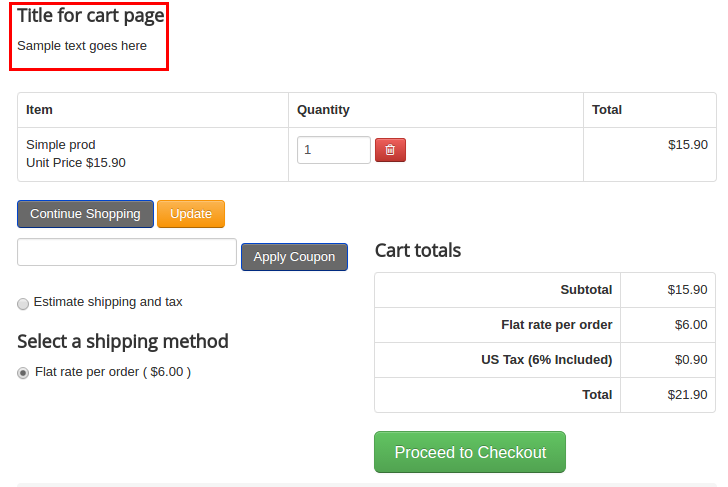
**j2store-cart-top** - Top of cart page

**j2store-cart-bottom** - Bottom of cart page

![Cart positions](https://1405307842-files.gitbook.io/~/files/v0/b/gitbook-x-prod.appspot.com/o/spaces%2FkVKvFBYm8luCOko7zt2v%2Fuploads%2FdvHgjvcNMWxr6fs3yslQ%2Fcart_module.webp?alt=media\&token=97c55b7b-9463-4f63-8b30-1c2690be0c41)

![Frontend view](https://raw.githubusercontent.com/j2store/doc-images/master/layout/special-module-positions/spl_mod_pos_cart-front.png)

**Video Tutorial:**

{% embed url="<https://youtu.be/aiTvXII33fg>" %}

## Checkout page <a href="#checkout-page" id="checkout-page"></a>

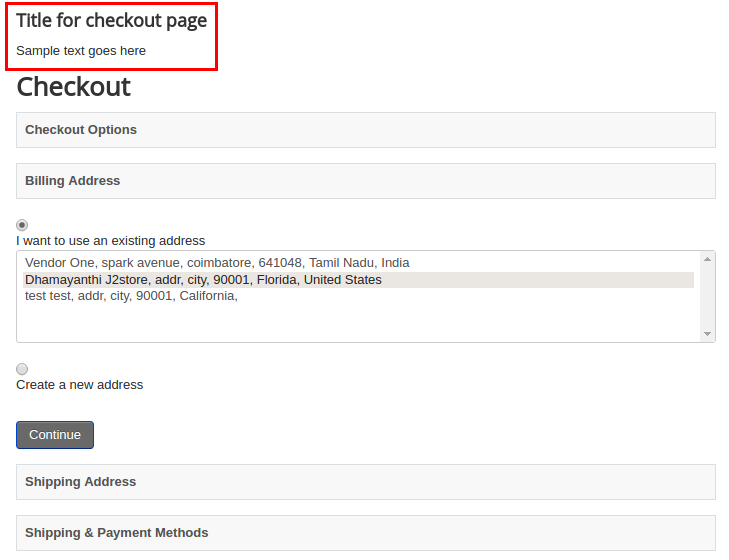
**j2store-checkout-top** - Top of checkout page

**j2store-checkout-bottom** - Bottom of checkout page

![Checkout postions](https://raw.githubusercontent.com/j2store/doc-images/master/layout/special-module-positions/spl_mod_pos_checkout.png)

![Frontend checkout special module positions](https://raw.githubusercontent.com/j2store/doc-images/master/layout/special-module-positions/spl_mod_pos_checkout-front.png)

## Checkout Results page <a href="#checkout-results-page" id="checkout-results-page"></a>

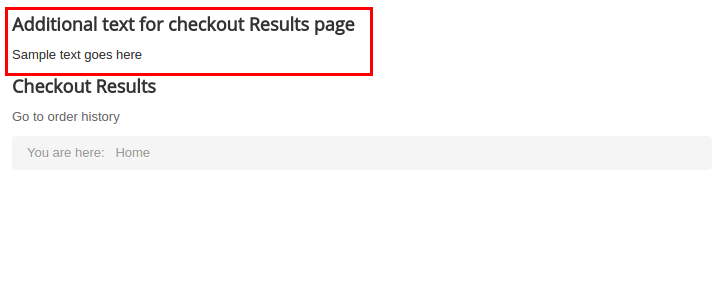
**j2store-postpayment-top** - Top of Checkout Results page

**j2store-postpayment-bottom** - Bottom of Checkout Results page

![Checkout result positions](https://raw.githubusercontent.com/j2store/doc-images/master/layout/special-module-positions/spl_mod_pos_check-results.png)

![Checkout results frontend](https://raw.githubusercontent.com/j2store/doc-images/master/layout/special-module-positions/spl_mod_pos_check-res-front.png)

## Special Module Positions for J2Commerce Dashboard <a href="#special-module-positions-for-j2store-dashboard" id="special-module-positions-for-j2store-dashboard"></a>

There is also special module positions available for customizing J2Commerce Cpanel (Dashboard).

**j2store-module-position-1 j2store-module-position-3 j2store-module-position-4 j2store-module-position-5**

Go to Extensions > Modules. Choose the **Administrator** section, click 'New', and choose custom module. Enter the name of the module and set the position to one of J2Commerce backend special module positions (given above). See the screenshots below,

![Creating a new module](https://raw.githubusercontent.com/j2store/doc-images/master/layout/special-module-positions/spl_mod_pos_create-new-mod.png)

![Custom module for special module positions](https://raw.githubusercontent.com/j2store/doc-images/master/layout/special-module-positions/spl_mod_pos_custom-mod.png)

![Admin end](https://raw.githubusercontent.com/j2store/doc-images/master/layout/special-module-positions/spl_mod_pos_admin-end.png)