# Usecases

So, what are the uses of the new menu item, Product tag view? Here is all that you can achieve with the tag layout of J2Commerce:

* Assign a product to multiple categories
* Display brand-wise products.

## Assigning a product to multiple categories: <a href="#assigning-a-product-to-multiple-categories" id="assigning-a-product-to-multiple-categories"></a>

With the conventional list layout, it is possible to organize products based on their categories. However, there is one catch. It is not possible to assign a product to multiple categories.

Overcoming this, now we have the tag layout where it is possible for a product to be assigned to multiple categories.

**Steps to be followed:**

* Create tags that you wish to link with the product.
* Create a product and add the tags to the product.
* Create menus and link the tags with the respective menus.

### Scenario <a href="#scenario" id="scenario"></a>

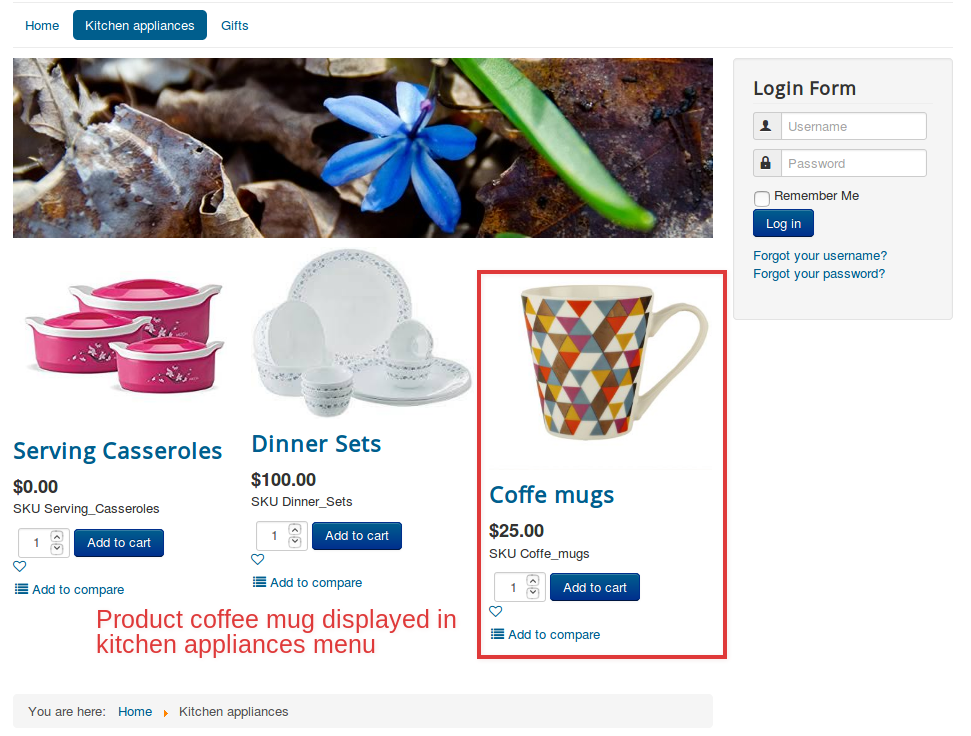
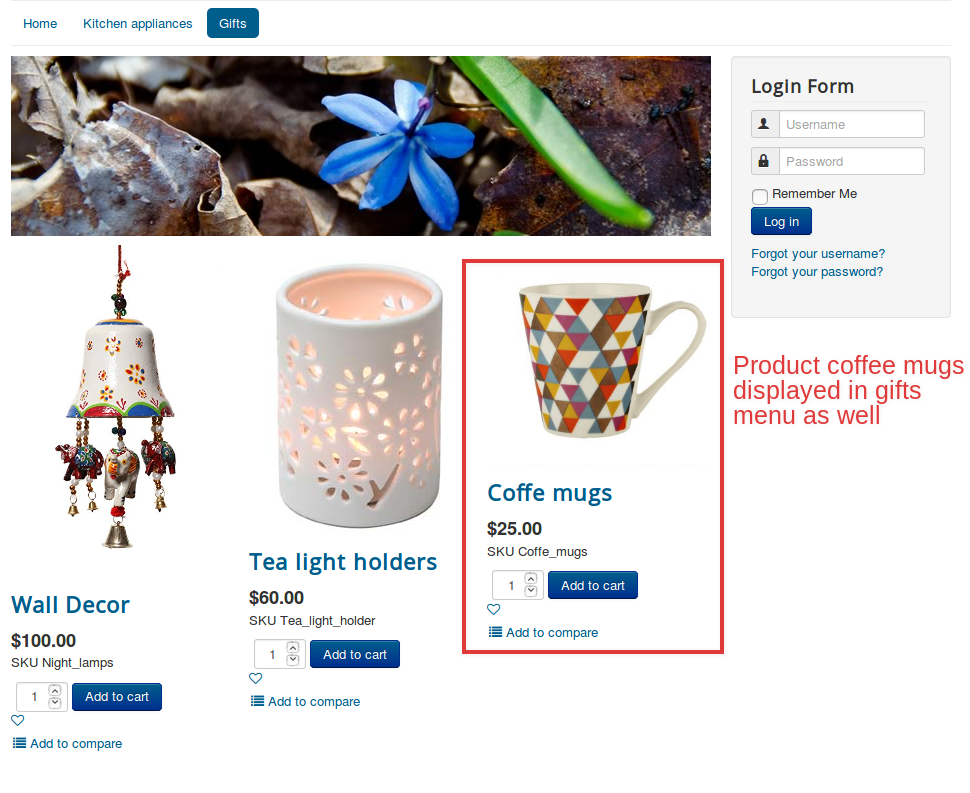
Products like Coffee mugs should be available under two categories- Kitchen appliances and Gifts.

**Steps to be done:**

* Create two tags: Gifts, Kitchen appliances.
* Create a product named coffee mugs.
* Assign both tags to the product article.
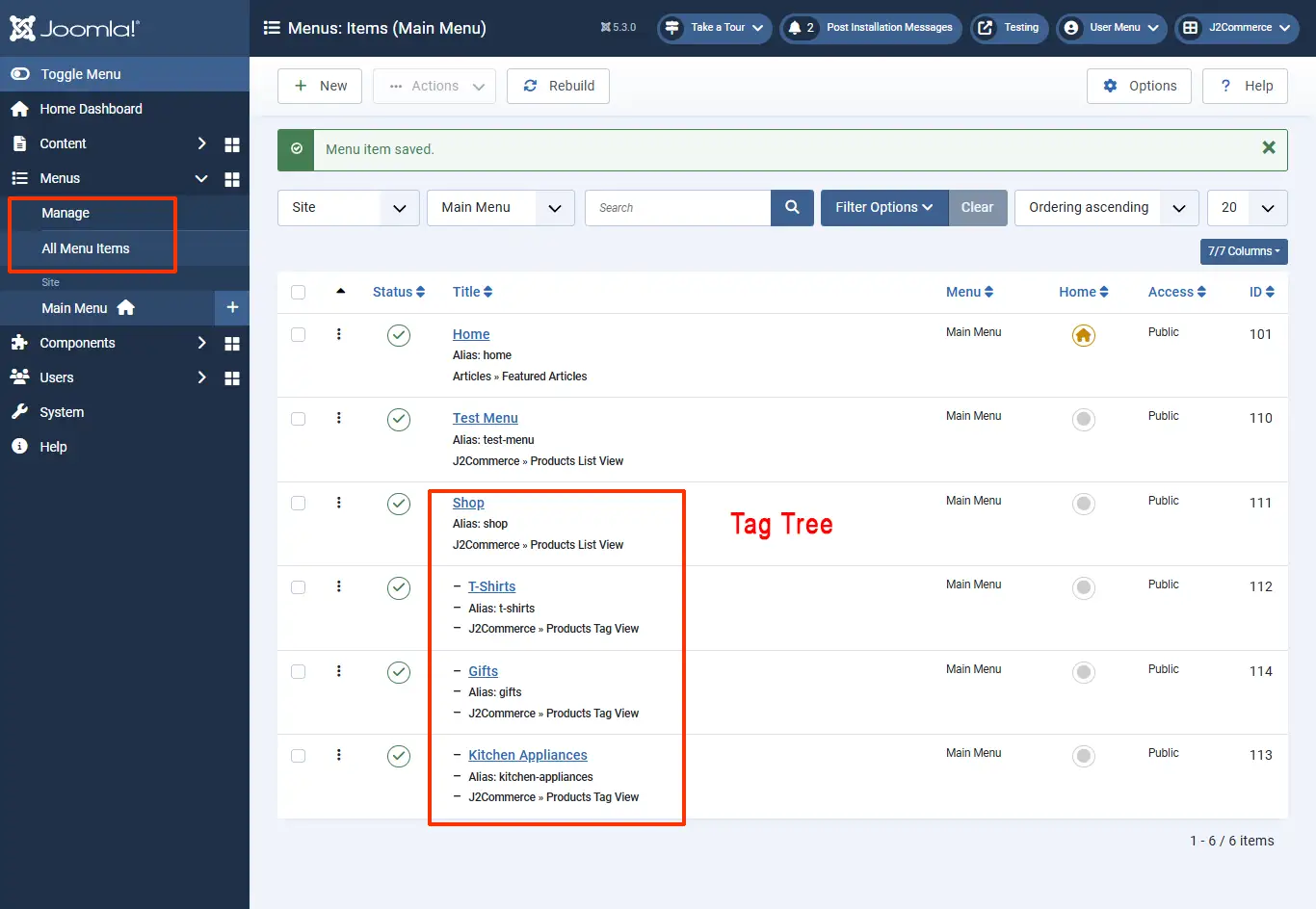
* Create menu items of the type Product tag view: Kitchen appliances, associating the tag Kitchen appliances, and Gift,s associating the tag Gifts.
* Now the product coffee mugs will be available in both Kitchen appliances and Gifts.

Likewise, we can assign products to as many categories as we wish.

Relevant Screenshots:

![usecase1](https://1405307842-files.gitbook.io/~/files/v0/b/gitbook-x-prod.appspot.com/o/spaces%2FkVKvFBYm8luCOko7zt2v%2Fuploads%2Ffv67Kp8X98CpY7UyAvW0%2Fadding%20more%20tags2.png?alt=media\&token=b31651ac-2955-43e6-9129-22cdbbf2e97d)

<figure><img src="https://1405307842-files.gitbook.io/~/files/v0/b/gitbook-x-prod.appspot.com/o/spaces%2FkVKvFBYm8luCOko7zt2v%2Fuploads%2FpstyEbKbGacu3sciYsNq%2Fadding%20a%20tag%20tree2.webp?alt=media&#x26;token=936c6e20-15d3-46b2-95be-64ba36d9ef3f" alt=""><figcaption><p>menu item tag tree</p></figcaption></figure>

![usecase2](https://1405307842-files.gitbook.io/~/files/v0/b/gitbook-x-prod.appspot.com/o/spaces%2FkVKvFBYm8luCOko7zt2v%2Fuploads%2FVZ3kKJXaob4wJw4BfGVV%2Fadding%20multiple%20tags2.png?alt=media\&token=1fbfbbc7-2b8f-4bab-8cb3-8fed0e8bbb73)

The front-end view is like this:

![useacse3](https://1405307842-files.gitbook.io/~/files/v0/b/gitbook-x-prod.appspot.com/o/spaces%2FkVKvFBYm8luCOko7zt2v%2Fuploads%2F9ofYhRDV0JpVLSxPDlgm%2Fkitchen%20tag2.webp?alt=media\&token=3e61b8b1-2887-489e-829c-7772bad1dafa)

![usecase4](https://1405307842-files.gitbook.io/~/files/v0/b/gitbook-x-prod.appspot.com/o/spaces%2FkVKvFBYm8luCOko7zt2v%2Fuploads%2FNKTCnkadmLSksLcqi0Ag%2Fgifts%20tag2.webp?alt=media\&token=1ea82b7b-e225-4a6f-9ef2-8f83d46de242)

![usecase5](https://raw.githubusercontent.com/j2store/doc-images/master/layout/usecases/producttagusecase5.png)

![usecase6](https://raw.githubusercontent.com/j2store/doc-images/master/layout/usecases/producttagusecase6.png)

## Displaying products brand-wise <a href="#displaying-products-brand-wise" id="displaying-products-brand-wise"></a>

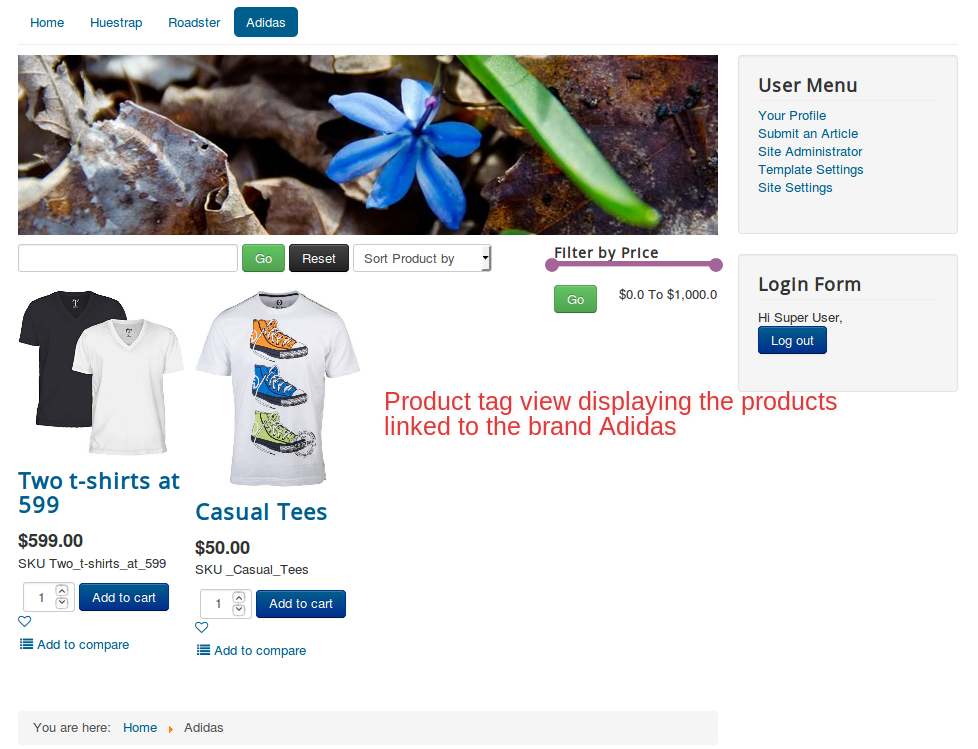
If you own a multi-brand store, then this feature might help you the most. You could display your products brand-wise. All you have to do is this:

* Create tags with the brand name.
* Create products and link them to their corresponding brands (tags).
* Create menu items of the type Tag view and associate the tags with them accordingly.

### Scenario <a href="#scenario-1" id="scenario-1"></a>

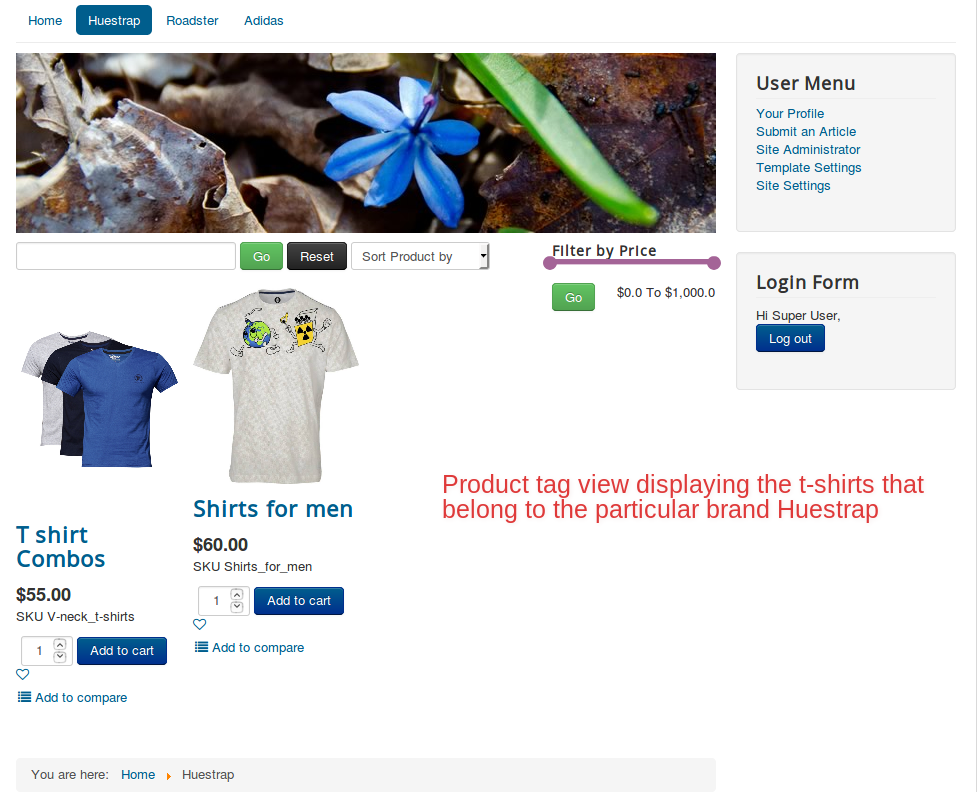
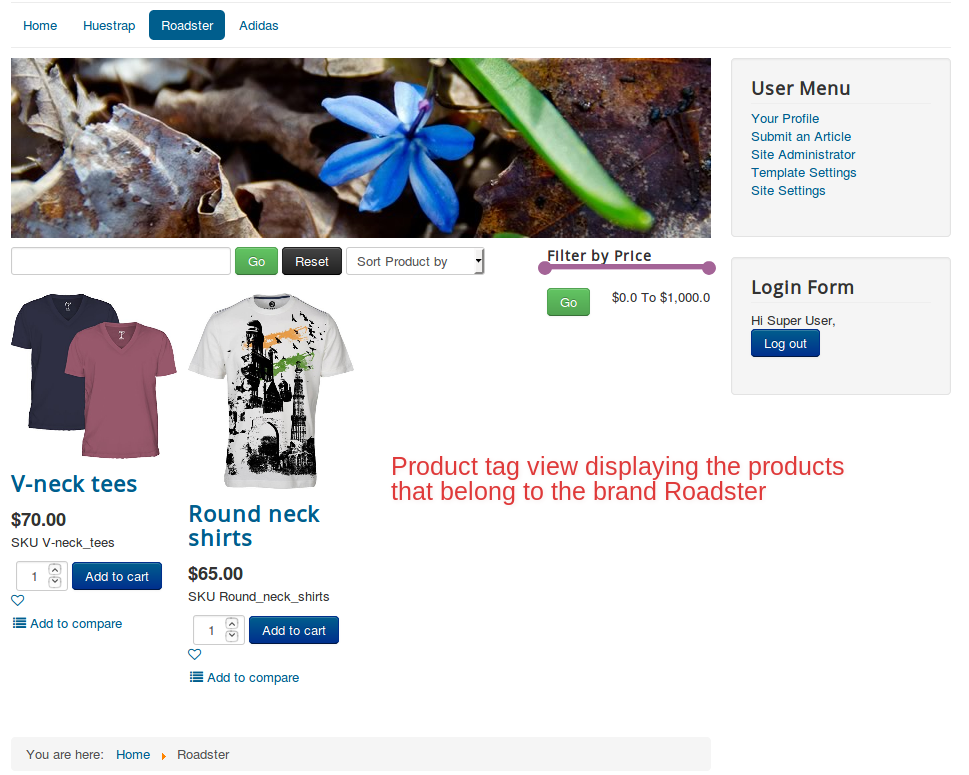
Our goal is to list the shirts in the store according to their brand. We have the following brands:

* Huetrap
* Roadster
* Adidas

**Steps to be done:**

* Create tags of the names Huetrap, Roadster, and Adidas.
* Create corresponding products and link them to the tag Huetap, and repeat the process for other brands.
* Create menu items that are associated with the brand tags, respectively.

**Relevant Screenshots**

![producttag1](https://1405307842-files.gitbook.io/~/files/v0/b/gitbook-x-prod.appspot.com/o/spaces%2FkVKvFBYm8luCOko7zt2v%2Fuploads%2F9MzPnZhfPrpGISLEkDDH%2Ftags%20for%20men3.webp?alt=media\&token=1e807acf-7f23-4a0a-ba72-d236a5fc5d4e)

![producttag2](https://1405307842-files.gitbook.io/~/files/v0/b/gitbook-x-prod.appspot.com/o/spaces%2FkVKvFBYm8luCOko7zt2v%2Fuploads%2Frrz7pwMIr0i8DnyLwdty%2Fshoes%20for%20men2.webp?alt=media\&token=c9eca9b4-bb01-414f-aedf-a37306316e8a)

![producttag3](https://1405307842-files.gitbook.io/~/files/v0/b/gitbook-x-prod.appspot.com/o/spaces%2FkVKvFBYm8luCOko7zt2v%2Fuploads%2F2MvXnhKHBTDwVfDQP03y%2Fshop%20articles2.webp?alt=media\&token=79ea42de-f194-4dc3-ab1b-0868f2e69aa7)

![usecasetwo3](https://1405307842-files.gitbook.io/~/files/v0/b/gitbook-x-prod.appspot.com/o/spaces%2FkVKvFBYm8luCOko7zt2v%2Fuploads%2FTcq1GPznT3FzwsnuoBTf%2Ftags%20for%20men2.webp?alt=media\&token=71566348-8ad3-41e3-bf4f-356fb6d7cce7)

![usecasetwo4](https://raw.githubusercontent.com/j2store/doc-images/master/layout/usecases/producttagusecasetwo4.png)

![useacsetwo4a](https://raw.githubusercontent.com/j2store/doc-images/master/layout/usecases/producttagusecasetwo4a.png)

![usecasetwo4b](https://raw.githubusercontent.com/j2store/doc-images/master/layout/usecases/producttagusecasetwo4b.png)

## Video tutorial: <a href="#video-tutorial" id="video-tutorial"></a>

The following video illustrates how to display products brand-wise:

{% embed url="<https://youtu.be/07tEdkEenSE>" %}